Showing posts with label Network. Show all posts

Monday, 6 February 2017

Address Resolution Protocol

Address Resolution Protocol (ARP)

ARP is used to translate an IP address into MAC address.

If Computer1 wants to communicate with Computer2 on a LAN,  when it comes to Layer2 Communication ( Data Link Layer ), computers identify each other with MAC addresses.

When Comp1 gets the IP of Comp2:

Ø It looks at its own cache to see if it has the MAC address

Ø If present, it appends message with the address and sends it over. Else, it will broadcast a message to all the systems in the network asking for a MAC address

Ø The ARP Request is received by all the systems but only the computer with the target IP responds to it

Ø Now, since both Comp1 & Comp2 have IP and MAC, they can communicate

Router Information Protocol

·      RIP is a distance vector protocol. Using RIP, each router sends its entire routing table to its closest neighbors every 30 seconds
·      The neighbors in turn will pass the information on to their nearest neighbors, and so on
·      If a router crashes or a network connection is severed, the network discovers this because that router stops sending updates to its neighbors, or stops sending and receiving updates along the severed connection
·      If a given route in the routing table isn't updated across six successive update cycles (that is, for 180 seconds) a RIP router will drop that route, letting the rest of the network know via its own updates about the problem and begin the process of reconverging on a new network topology.


Ø When router receives routing updates, it compares them with the routes which it already has in its routing table.

Ø If update has information about a route which is not available in its routing table, router will consider that route as a new route.

Ø Router will add all new routes in routing table before updating existing one.

Ø If update has better information for any existing route, router will replace old entry with new route.

Ø If update has exactly same information about any existing route, router will reset the timer for that entry in routing table.


Saturday, 4 February 2017

Types of Dynamic Routing Protocols


IGP – Interior Gateway Protocol (OSPF , RIP, EIGRP) : Used to find network path information within a single autonomous system(AS)

1.   DISTANCE VECTOR –

Distance vector routing is so named because it involves two factors: the distance, or metric, of a destination, and the vector, or direction to take to get there.

Routing information is only exchanged between directly connected neighbors. This means a router knows from which neighbor a route was learned, but it does not know where that neighbor learned the route; a router can't see beyond its own neighbors

2.   LINK STATE –

Link-state routing, in contrast, requires that all routers know about the paths reachable by all other routers in the network.

Link-state information is flooded throughout the link-state domain to ensure all routers posses a synchronized copy of the area's link-state database.

From this common database, each router constructs its own relative shortest-path tree, with itself as the root, for all known routes


EGP – Exterior Gateway Protocol  – Used to find network path information between different autonomous systems.

BGP is the only EGP that exists currently.

Commonly used terminologies:

HOP COUNT - Hop count is the number of network devices between the starting node and the destination node


AUTONOMOUS SYSTEM – Internetwork under the control of a single organization. Ex: AT&T, University Network

OSPF Protocol

OSPF – Open Shortest Path First Protocol

Routers connect networks through IP. OSPF is used to to find the best path for the packets as they pass through a set of connected networks.

OSPF is a Link State Protocol. Link State Protocol exchange the state of their links and the cost associated with it.

OSPF, when configured, will listen to its neighbors and gather all link state data available to build a topology map of all available paths in the network & save this information in the Topology Database.

With this information, it calculates the shortest path using the Dijkstra algorithm.

OSPF Areas:

A number of routers are grouped together into Routing Areas to simplify and optimize resource available resources.

Having multiple routers can flood the network and reduce efficiency. Hence, having resource optimization is especially important for large enterprise systems.

Areas are a logical collection of routers that carry the same Area ID or number inside of an OSPF network, the OSPF network itself can contain multiple areas, the first and main Area is called the backbone area “Area 0”, all other areas must connect to Area 0.


Friday, 3 February 2017

IPV4 v/s IPV6

IPV4 ( Internet Protocol Version4 ) is the most widely used Internet Protocol to connect to the Internet.

It uses 32- bits with a total of 2^32 addresses. With the growth of internet, the number of addresses available will eventually run out!

IPV6 being the newest version would increase the pool of addresses along with many other advantages over the previous version:

- Auto-configuration
- No more private address collisions
- Better multicast routing
- Simpler header format
- Simplified, more efficient routing

An IP address is a binary number but can be stored as text for human readers.  For example, a 32-bit numeric address (IPv4) is written in decimal as four numbers separated by periods. Each number can be zero to 255. For example, 1.160.10.240 could be an IP address.

IPv6 addresses are 128-bit IP address written in hexadecimal and separated by colons. An example IPv6 address could be written like this: 3ffe:1900:4545:3:200:f8ff:fe21:67cf

Text FSM

Text FSM
  • Python module/library to get structured data out of raw data got from a network device( Routers and Switches )
  • TextFSM is a template based state machine built by Google to simplify dealing with Regular Expressions and getting data from traditional network devices

Consider a sample input:

VLAN Type  Vlan-mode
---- ----- ----------
1    enet  CE    
2    enet  CE    
3    enet  CE    
4    enet  CE    
5    enet  CE  

Sample FSM Template that will define the data we want to extract:

Value VLAN_ID (\d+)
Value TYPE (\w+)
Value MODE (\w+)

First variables are defined. Next to each variable name is the regular expression that represents it.

The FSM code to parse the required information looks like :

Start
  ^${VLAN_ID}\s+${TYPE}\s+${MODE}\s+ -> Record


Makes your life easy while working with pattern matching : http://www.regexr.com/


Further Reading – Official Documentation https://code.google.com/archive/p/textfsm/wikis/TextFSMHowto.wiki

TCP and UDP Protocol

TCP and UDP

·      Protocols used for sending packets ( bits of data )
·      Packets are forwarded from our computer via routers to a destination

TCP

When we load a webpage: 

  • TCP Packets àre sent to the web server address, Web server responds with a stream of TCP packets stitched together by browser to render the web page.
  • TCP isn’t just one way communication. The remote system sends packets back to acknowledge it’s received your packets.
  • TCP guarantees the recipient will receive the packets in order by numbering them. The recipient sends messages back to the sender saying it received the messages. If the sender doesn’t get a correct response, it will resend the packets to ensure the recipient received them. Packets are also checked for errors
  • TCP is all about this reliability . The packets sent with TCP are tracked so no data is lost or corrupted in transit. This is why file downloads don’t become corrupted even if there are network hiccups

UDP

  • UDP stands for User Datagram Protocol — a datagram is the same thing as a packet of information.
  • When using UDP, packets are just sent to the recipient. The sender won’t wait to make sure the recipient received the packet 
  • UDP is used when speed is desirable and error correction isn’t necessary.

EXAMPLE: Live streaming videos or online video games

For example, let’s say you’re watching a live video stream. Live streams are often broadcast using UDP instead of TCP. The server just sends a constant stream of UDP packets to computers watching. If you lose your connection for a few seconds, the video will freeze for a moment and then jump to the current bit of the broadcast, skipping the bits you missed. If you experience minor packet-loss, the video or audio may be distorted for a moment as the video continues to play without the missing data.

Wednesday, 1 February 2017

iperf:Network performance measuring tool

 Iperf is a commonly used network testing tool that can create Transmission Control Protocol (TCP) and User Datagram Protocol (UDP) data streams and measure the throughput of a network that is carrying them.

 Installation

 wget http://downloads.es.net/pub/iperf/iperf-3.0.11.tar.gz
gunzip -c iperf-3.0.11.tar.gz | tar xopf –
cd iperf-3.0.11
./configure
make
make install
export PATH=$PATH:/home/opc/iperf-3.0.11/src

Test execution

Assume that we need to measure network performance between machines “A” and “B”

Scenario#1:- A:client B:server
 In this scenario A sends data to B.B acts as a receiver 
  • Step#1: Start the listener in B(server)

          iperf3 –s –p {port number}


  • Step#2: start the client (machine A) 


    iperf3 –c  {machine B ip} –p {port number}  –i  1 –t 90 –O 30 –w 1.5M –P 1 


    i:how frequently we want to collect the data(in our example its 1s)
    t:test duration in sec(in our example its 90s)
    O:omits the results  for those many second(in our example its 30s)
    w:tcp window size for sender and receiver
    P:Number of parallel threads you want to run(in our example its 1)
Parameter in sysctl which are related to tcp are "net.core.wmem_max,  net.core.rmem_max,  net.ipv4.tcp_window_scaling,  net.ipv4.tcp_wmem,  net.ipv4.tcp_rmem".

 http://www.slashroot.in/iperf-how-test-network-speedperformancebandwidth

Tuesday, 31 January 2017

OSI MODEL


Basics of each layer in OSI model


Further details on each OSI model layer protocols/features


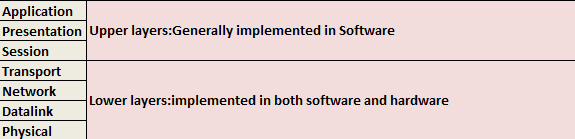
Implementation details OSI model


Various terminologies used for data transferred in each layer


 In which layer does Switch or Router exists?